1、下载termux软件,下载地址如下:
https://github.com/termux/termux-app/releases #建议根据自己的手机安卓系统版本进行安装2、下载开心电视助手V8.2版本,下载地址如下:
下载地址:https://www.32r.com/soft/116226.html3、termux里然后执行相关指令:
pkg update && pkg upgrade -y      #更新指令
pkg install wget proot tar -y     #proot安装
4、具体Ubuntu系统安装指令
https://shop.1851039.xyz/buy/12 #脚本下载地址
4.1 Ubuntu22系统-xfce:

https://shop.1851039.xyz/buy/12

4.2 Ubuntu20系统-xfce:

https://shop.1851039.xyz/buy/12
5、Debain系统安装指令:
https://shop.1851039.xyz/buy/12 #脚本下载地址
Debain10系统-xfce:

https://shop.1851039.xyz/buy/12

查看系统信息:
cat /etc/os-release    #查看相关版本信息

更新数据源:
apt update            #如果更新不下来,需要更新下载的软件包源,执行如下命令:

源系统的Debian 10 Buster系统可能已经停止维护,需要去掉以前的源,所以需要运行
所以需要从deb.debian.org
ftp.debian.org 转到archive.debian.org,需要运行以下脚本 一定要在界面里粘贴脚本

cat > /etc/apt/sources.list << 'EOF'
deb http://archive.debian.org/debian buster main contrib non-free
deb http://archive.debian.org/debian-security buster/updates main contrib non-free
EOF

然后关闭时间校验(必须)
echo 'Acquire::Check-Valid-Until "false";' > /etc/apt/apt.conf.d/99no-check-valid

然后再执行:
apt update
6、安装opencode
apt update     #更新数据源
apt install curl -y       #如果没有安装curl的话需要安装
curl -fsSL https://opencode.ai/install | bash   #安装opencode

查看opencode安装到了哪个路径下
find / -name "opencode*" 2>/dev/null         执行这个指令以后提示了:/root/.opencode/bin/opencode

然后执行
ln -s /root/.opencode/bin/opencode /usr/local/bin/opencode   #opencode 加入直接运行命令
7、安装openclaw
curl -fsSL https://openclaw.ai/install.sh | bash

如果安装失败以后,确认是否有环境,先查看
nodejs -v
有版本号说明nodejs安装成功,然后再安装NPM
apt install nodejs npm -y        安装Nodejs里的NPM软件
确认NPM安装完成以后同样需要查看NPM的版本号
NPM -v
有显示说明,继续下一步,

或者直接用opencode来安装Openclaw,安装成功后,运行

openclaw dahboard

openclaw gateway --verbose

生成token或查看token
openclaw doctor --generate-gateway-token       #生成token

cat ~/.openclaw/openclaw.json       #查看token


在登录后台后就自动启动openclaw,
pgrep -f "openclaw gateway" > /dev/null || nohup openclaw gateway --verbose > /root/openclaw.log 2>&1 &

source ~/.bashrc

例如科技lion的脚本安装其他token API
curl -sL kejilion.sh -o kejilion.sh
bash kejilion.sh app openclaw
通过Debian系统安装openclaw速度更快
源系统的Debian 10 Buster系统可能已经停止维护,需要去掉以前的源,所以需要运行
所以需要从deb.debian.org
ftp.debian.org 转到archive.debian.org,需要运行以下脚本

cat > /etc/apt/sources.list << 'EOF'
deb http://archive.debian.org/debian buster main contrib non-free
deb http://archive.debian.org/debian-security buster/updates main contrib non-free
EOF

然后关闭时间校验(必须)
echo 'Acquire::Check-Valid-Until "false";' > /etc/apt/apt.conf.d/99no-check-valid
直接一个字母进入所需要的系统,最终实现按字母u进入ubuntu22系统,按d进入debian10系统
echo "alias u='./start-ubuntu22.sh'" >> ~/.bashrc
echo "alias d='./start-debian.sh'" >> ~/.bashrc
source ~/.bashrc
让本机的finalshell连接到手机的termux方法:
需要在手机termux安装SSH,安装如下:
pkg install openssh -y     #安装指令
sshd                       #启动SSH,一定要执行才可以SSH连接到termux

#进入termux就启动SSH的脚本:
echo 'pgrep sshd > /dev/null || sshd' >> ~/.bashrc && source ~/.bashrc

设置密码:
passwd                 #密码自行设定 123345 反正是在局域网里
然后查看用户名:  在termux里执行
whoami                 #然后记录用户名进行finalshell连接,
端口号:Termux 里的 OpenSSH 默认端口是 8022
如下截图:

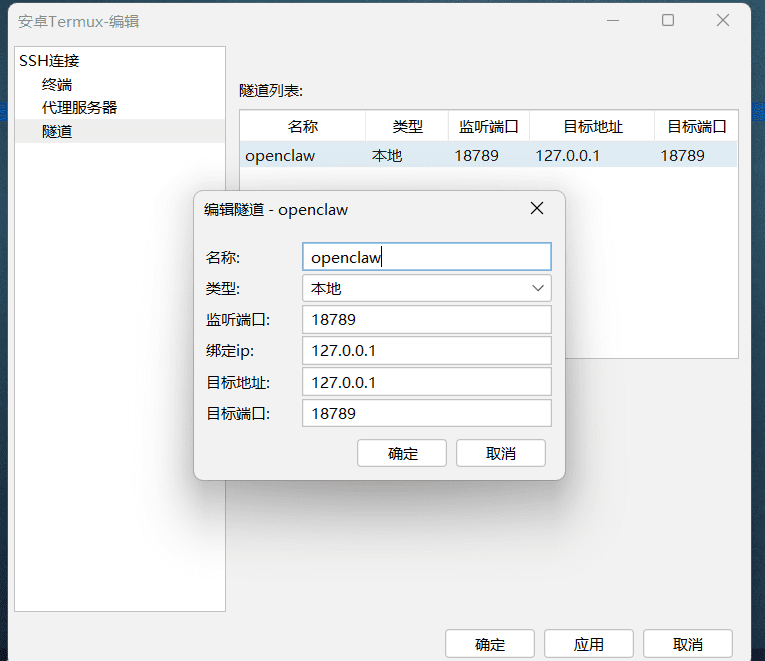
fialshell添加隧道实现和Openclaw局域网通信功能设置