
推荐的服务器购买地址:https://my.racknerd.com/aff.php?aff=10522
不同的机器有优惠哦。

Rovo Dev CLI 的部署
1、Rovo Dev CLI注册https://www.atlassian.com/solutions/devops/ai-innovation
2、安装过程:可打开查看
- Install ACLI (or update to the latest version if you already have ACLI installed) using instructions for your OS:
3、windows安装
1)下载最新版本:
x86-64:
Invoke-WebRequest -Uri https://acli.atlassian.com/windows/latest/acli_windows_amd64/acli.exe -OutFile acli.exe
ARM64:
Invoke-WebRequest -Uri https://acli.atlassian.com/windows/latest/acli_windows_arm64/acli.exe -OutFile acli.exe
2)确实是否下载成功:
在powershell下运行:.\acli.exe –help
- 获取API KEY Atlassian profile.
- 然后run登录:
- .\
acli rovodev auth login - 输入注册的邮箱,粘贴申请的API KEY
- 然后开启acli:
.\acli rovodev run
然后可以将其加入到环境变量里面
win+R键
输入:sysdm.cpl
然后再环境变量的path里面加入你的文件夹路径,例如路径:D:\Program Files\Rovo Dev CLI
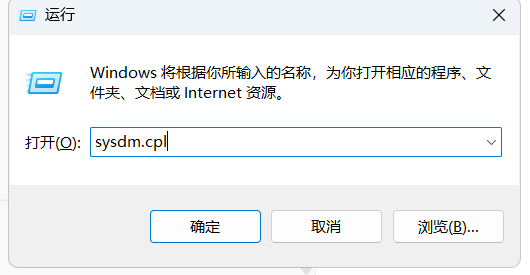

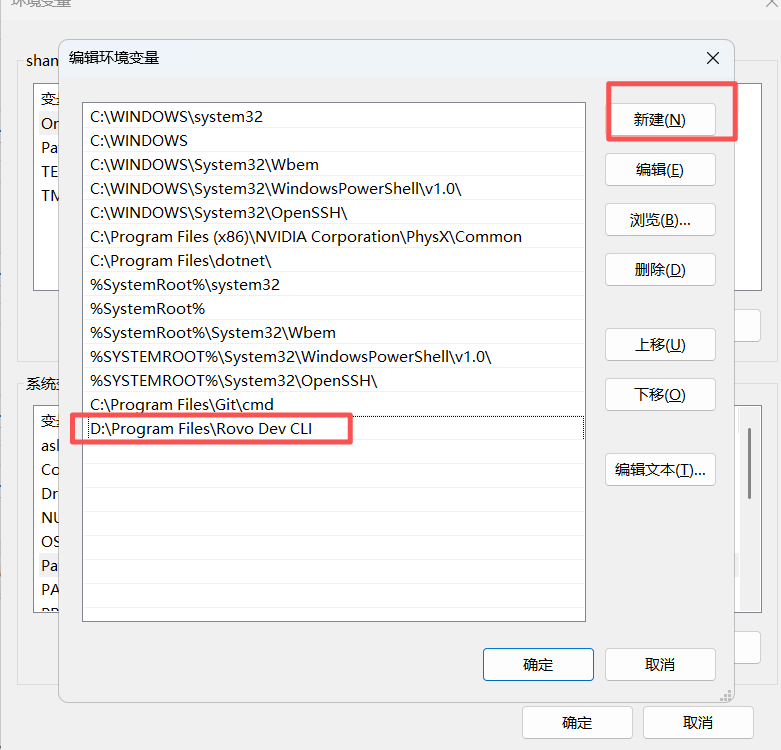
然后在项目路径下运行: 不用加./就可以在绝对路径下运行
acli rovodev runlinux安装(debain系统&ubanue系统)
1、安装环境
sudo apt-get install -y wget gnupg2
2、安装和给权限
1)sudo mkdir -p -m 755 /etc/apt/keyrings
2)wget -nv -O- https://acli.atlassian.com/gpg/public-key.asc | sudo gpg --dearmor -o /etc/apt/keyrings/acli-archive-keyring.gpg
3)sudo chmod go+r /etc/apt/keyrings/acli-archive-keyring.gpg
4)echo "deb [arch=$(dpkg --print-architecture) signed-by=/etc/apt/keyrings/acli-archive-keyring.gpg] https://acli.atlassian.com/linux/deb stable main" | sudo tee /etc/apt/sources.list.d/acli.list > /dev/null
3、安装ACLI
sudo apt update
sudo apt install -y acli
注意:如果提示没有安装GIT ,就执行
apt-get install git登录指令:
acli rovodev auth login运行指令
acli rovodev run接下来是版本升级,从1.3.9升级到1.3.13版本
下载最新版ACLI
curl -LO "https://acli.atlassian.com/linux/latest/acli_linux_amd64/acli"
给执行权限
chmod +x acli覆盖现有 acli 版本
sudo mv acli /usr/bin/acli
或者如果你用的是 /usr/local/bin:
sudo mv acli /usr/local/bin/acli
检查版本
acli --version